
Download Microsoft SQL Server 2008 Express (64-bit) – database, SQL, server, data management, 64-bit, Microsoft, Express, Windows, development, tool, utility, application, storage, backup, query, optimization, integration, security, performance, scalability, lightweight, embedded, web, desktop, small server
Overview
Microsoft SQL Server 2008 Express (64-bit) is a lightweight yet powerful data management solution designed for developers, small businesses, and IT professionals who require a reliable database engine for desktop, embedded, or small server applications. Built on the 64-bit architecture, this version offers improved scalability and performance over its 32-bit counterpart, making it suitable for environments that handle larger datasets or demand higher computational efficiency. The application serves as a foundational tool for managing structured data, supporting tasks such as data storage, retrieval, backup, and secure access.
It is particularly well-suited for developers integrating database functionality into their applications, as it enables seamless deployment and redistribution without licensing costs. The tool also supports use cases in light web applications, local data stores, and prototyping environments where full-scale database systems are unnecessary. Its integration with existing Microsoft server infrastructure allows organizations already invested in the Windows ecosystem to extend their capabilities with minimal overhead.
As a product from Microsoft, a globally recognized technology leader, the software benefits from established reliability and long-term support within the developer community. Although the developer did not provide additional technical details regarding modern system compatibility or future updates, its enduring presence in enterprise and educational settings underscores its utility. The application remains relevant for legacy systems, training environments, and small-scale deployments where performance and cost-efficiency are critical.
Key Features & Functionality
- Advanced Data Storage and Retrieval – SQL Server 2008 Express (64-bit) supports efficient handling of structured data with optimized indexing and query execution, enabling fast access to information in both desktop and small server environments.
- Reliable Backup and Restore – The system includes built-in tools for creating and recovering database backups, ensuring data integrity and continuity in case of system failure or accidental data loss.
- Query Optimization – Enhanced query execution plans and performance tuning features help reduce processing time and improve response speed, especially when managing complex data operations.
- Role-Based Access Control – Users can define granular permissions and roles, restricting access to sensitive data and ensuring that only authorized individuals can perform specific actions.
- 64-Bit Performance Enhancements – Leveraging the 64-bit architecture, the system can utilize more memory and process larger workloads, resulting in improved responsiveness and scalability for demanding applications.
- Seamless Integration with Microsoft Ecosystem – The tool integrates smoothly with other Microsoft server technologies, including Windows Server, Visual Studio, and .NET frameworks, enabling streamlined development and deployment workflows.
- Redistributable for Application Packaging – Developers can embed SQL Server 2008 Express into their software packages, allowing end users to install the database engine alongside the application without additional setup steps.
For example, a small software vendor might bundle this database engine with a point-of-sale application, ensuring that customers can run the software locally without needing a separate database server. Similarly, a developer learning database concepts can use it to build and test queries in a secure, isolated environment.
Interface, UX & Performance
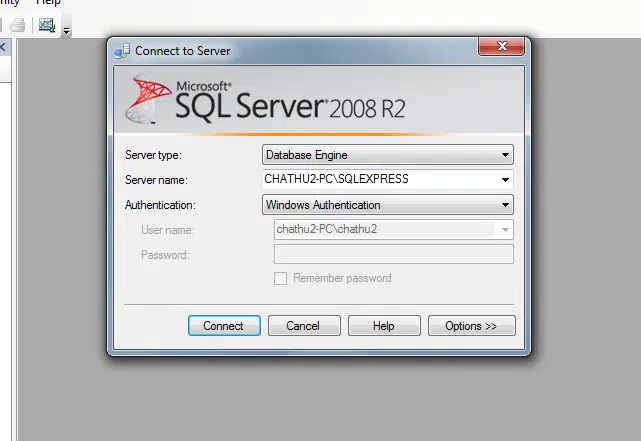
Microsoft SQL Server 2008 Express (64-bit) does not include a standalone graphical user interface (GUI) for direct database management. Instead, it is primarily accessed through command-line tools, integrated development environments (IDEs), or third-party database management software such as SQL Server Management Studio (SSMS). This design choice reflects its role as a backend engine rather than a user-facing application.
As a result, the user experience is heavily dependent on the external tools used to interact with the database. While this may pose a learning curve for beginners, it aligns with the expectations of developers and system administrators who are accustomed to working with database engines via code or scripting.
Although the developer did not list formal performance metrics, the 64-bit architecture suggests improved memory handling and better performance under load compared to 32-bit versions. The application is expected to function efficiently on modern Windows systems, particularly those with sufficient RAM and processing power. Responsiveness and stability are likely maintained within its intended use cases, such as local development, small-scale applications, and embedded systems.
Users should be aware that the lack of a native GUI may require additional setup steps to configure and manage databases effectively. However, for technical users, this modular approach enhances flexibility and control.
Platform Compatibility & Technical Requirements
Microsoft SQL Server 2008 Express (64-bit) is designed exclusively for the Windows platform. It requires a 64-bit version of Windows to operate, making it incompatible with older or non-Windows systems. The specific OS version is not listed, so users should ensure their Windows environment supports the 64-bit architecture and meets the minimum system requirements for SQL Server 2008.
The application has a file size of 208.7 MB, which is relatively compact for a database engine with full functionality. This makes it suitable for installation on machines with limited storage, especially in development or testing environments.
The developer did not specify minimum OS requirements, hardware specifications, or compatibility with newer Windows versions beyond the platform. Therefore, users should exercise caution when deploying on modern systems and verify system compatibility before installation. While the software remains available for download, its age suggests potential challenges with current security updates and system integration.
Pros and Cons
Pros
- Free to use and redistribute, reducing development and deployment costs.
- 64-bit architecture enables better memory utilization and performance.
- Supports robust data protection through encryption and role-based access.
- Seamless integration with Microsoft development tools and server infrastructure.
- Ideal for small-scale applications, embedded systems, and learning environments.
- Backed by Microsoft, ensuring long-term availability and stability.
Cons
- No native GUI; requires external tools for database management.
- Outdated release date (2008) raises concerns about modern security and compatibility.
- Developer did not provide current system requirements or OS compatibility details.
- Not suitable for high-traffic or enterprise-level applications.
- Limited to Windows 64-bit platforms, restricting cross-platform use.
- May lack support for newer database features and standards.
FAQ
Is Microsoft SQL Server 2008 Express (64-bit) free to download?
Yes, the software is available at no cost from Microsoft’s official website. It can be installed and redistributed without licensing fees.
Can I use this database engine on macOS or Linux?
No. The application is designed exclusively for Windows 64-bit systems and is not compatible with macOS, Linux, or other operating systems.
What tools are needed to manage databases in SQL Server 2008 Express?
Users typically require external tools such as SQL Server Management Studio (SSMS) or command-line utilities to configure, query, and maintain databases.
Is this version still secure for production use?
Given its release date in 2008 and lack of recent updates, it is not recommended for production environments that require modern security standards. It is best suited for testing, learning, or legacy systems.
How do I update Microsoft SQL Server 2008 Express?
Microsoft has not released official updates for this version since its initial release. Users should consider migrating to a supported SQL Server edition for improved security and features.
Final Thoughts
Microsoft SQL Server 2008 Express (64-bit) remains a viable option for developers and IT professionals working on lightweight, Windows-based applications. Its robust feature set, 64-bit performance advantages, and seamless integration with Microsoft’s ecosystem make it a dependable tool for small-scale data management. While it lacks modern UIs and faces compatibility challenges on newer systems, its cost-free nature and proven reliability continue to support its use in educational, prototyping, and legacy environments.
For those building desktop applications, embedded systems, or learning SQL and database design, this tool offers a solid foundation. However, users should carefully assess system compatibility and security implications before deployment.
Download Microsoft SQL Server 2008 Express (64-bit) now to enhance your development workflow and manage data efficiently on Windows platforms.


